
Most meal prep advice makes the same mistake: it treats Sunday as a cooking marathon. Three hours of chopping, six burners going at once, seventeen containers of food that all start tasting the same by Wednesday. You do it twice, burn out, and go back to figuring out dinner at 6pm every night.
The problem isn't meal prep itself. It's the approach. Efficient meal prep isn't about cooking everything in one heroic session — it's about planning smartly so the actual cooking is focused and fast.
This guide walks through a realistic system for prepping a full week of meals in under two hours, using recipes you've already saved and a meal planner that keeps everything organized from plan to plate.
"The secret to a two-hour meal prep isn't cooking faster. It's planning better so you're never deciding and cooking at the same time."
Where the Two Hours Actually Go
Before diving into the system, here's an honest breakdown of how a well-organized two-hour meal prep actually works. Most of the time isn't spent cooking — it's spent on the thinking and logistics that, when done right, make the cooking smooth.
Notice that planning and shopping account for 45 minutes — nearly half the budget. This is where most people lose time, because they're figuring out what to cook while they're already in the kitchen. The fix is to front-load the thinking so that by the time you start cooking, all the decisions are already made.
Step 1: Plan Your Week on Saturday (15 Minutes)
The single most effective change you can make to your meal prep routine is to do your planning the day before you cook. Saturday evening, pour something nice, and spend 15 minutes assigning meals to days for the coming week. By Sunday morning, the decisions are made and you can go straight to shopping and cooking.
Seasoned's Meal Planning tab is built exactly for this. It shows your full week at a glance — a calendar view at the top with back and forward arrows to move between weeks, and an agenda view below listing every day with any meals already planned. Each day has a plus button to add a recipe directly from your saved collection.
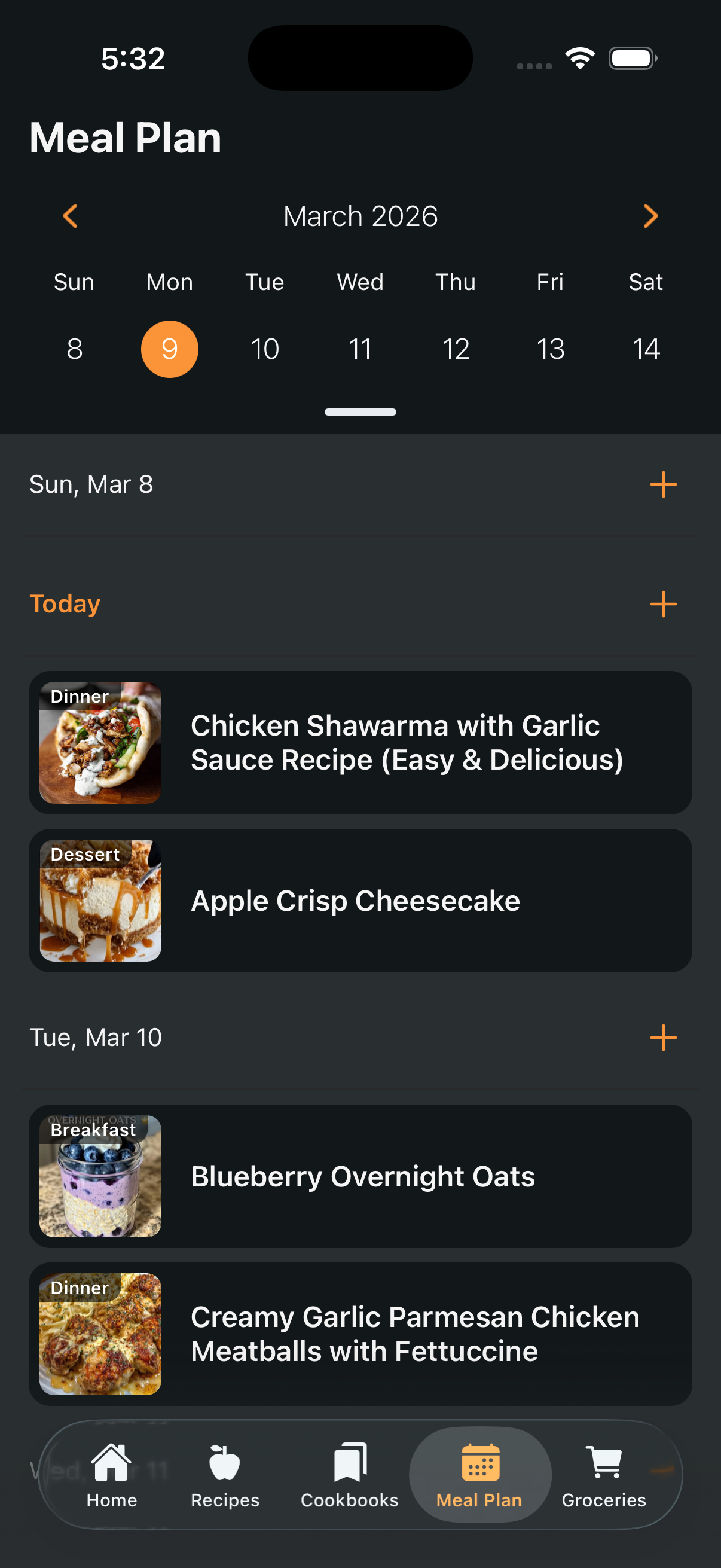
To add a recipe to a day, tap the plus button and a search dialog opens showing every recipe in your collection. Find what you want, select the meal type — breakfast, lunch, dinner, dessert, or snack — and it's added to that day. You can add as many recipes as you like to any day and any meal type.
💡 Plan for 4–5 Dinners, Not 7
Nobody cooks from scratch every single night. Plan for 4–5 dinners and leave two nights intentionally blank — one for leftovers and one for takeout or eating out. This keeps your plan realistic and means you're not throwing food away at the end of the week because you were too ambitious on Saturday.
Step 2: Scale Recipes for Batch Cooking (5 Minutes)
Meal prepping often means cooking larger quantities than a recipe is written for — doubling a soup so it covers two nights, or tripling a grain so it works across multiple lunches. In Seasoned, ingredient scaling is built directly into every recipe.
On any Recipe Details screen, you'll see a serving size with plus and minus buttons. Tap the plus to increase servings and every ingredient in the recipe scales up automatically and proportionally. No mental math, no risk of miscalculating a teaspoon into a tablespoon.
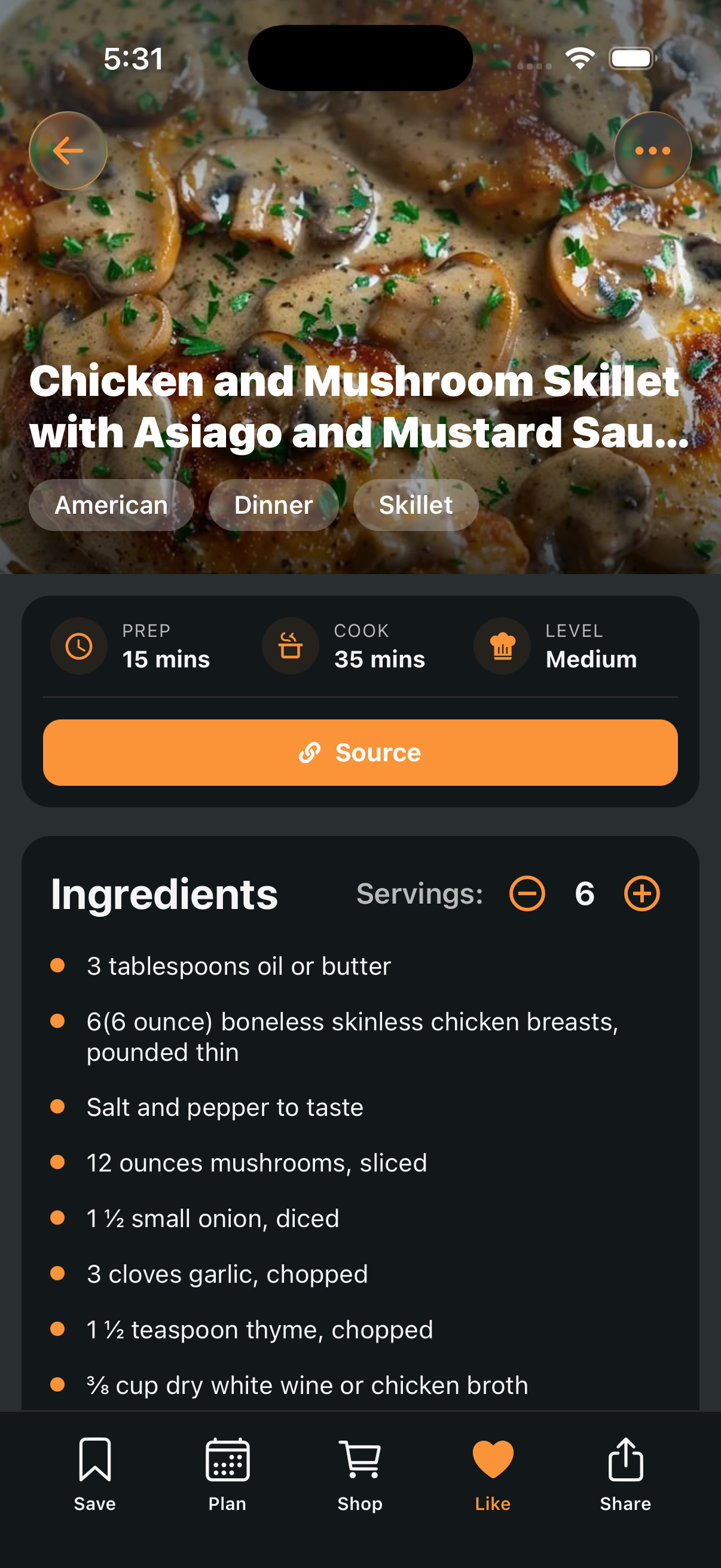
Scale your batch-cooking recipes before you shop, so your shopping quantities are accurate from the start. Once you're done, the original recipe stays untouched — Seasoned preserves the original and saves your changes separately.
Step 3: Shop Once for the Whole Week (30 Minutes)
With your meal plan set and your recipes scaled, you have everything you need to build a complete shopping list before you leave the house. Go through each planned recipe's ingredient list in Seasoned, add anything you don't already have at home, and shop once — not three times across the week.
The goal is a single focused shopping trip with no improvising at the store. When you know exactly what you need and roughly how much, a full week's shop takes 25–30 minutes, not an hour of wandering.
🛒 Coming Soon in Seasoned
Automatic grocery list generation directly from your meal plan is on the Seasoned roadmap. Once available, your full week's shopping list will be generated from your planned recipes in one tap — no manual cross-referencing needed. Stay tuned for this update.
Step 4: Cook in the Right Order (50 Minutes)
This is where most meal preps fall apart — not because people can't cook, but because they start the wrong thing first. The rule is simple: start whatever takes longest first, and fill the gaps with active prep.
Here's an example cook order for a typical batch prep session:
Start the slow cooker or oven dish first
Anything that takes 45+ minutes hands-off goes in first — a roast, a braise, a batch of grains. Set it and let it work while you do everything else.
Do all your chopping and prep at once
Chop every vegetable for every recipe before you cook any of them. Mise en place for the whole session — not one recipe at a time.
Cook stovetop dishes while oven runs
Now the oven is doing its thing hands-off, you have the stove free for soups, sauces, and anything that needs active attention.
Pull, rest, and portion
Everything comes out in the same window. Portion into containers while it's still warm, let cool before sealing, and you're done.
The key insight is that most cooking is waiting, not working. An oven dish at 375°F doesn't need you — it just needs time. The cook order turns that waiting into productive parallel time rather than dead time.
Using Cook Mode to Stay on Track
Once you're actually cooking, Seasoned's Cook Mode is your best tool for staying focused and on schedule. From your Meal Plan's agenda view, tap any recipe to open its details, then hit Cook Mode to switch into a distraction-free cooking interface: large text, one step at a time, with built-in timers that run directly from the cooking instructions.
Open your Meal Plan and tap the first recipe to cook
The agenda view shows all your planned recipes for the week with their images and meal types. Tap any recipe to open it directly.
Tap Cook Mode to begin
Cook Mode activates a focused, full-screen view of the recipe with large, easy-to-read steps. No ads, no scrolling, no distractions.
Use the built-in timers for anything that needs timing
Steps with cooking times have a timer you can start with a single tap — without leaving the recipe or opening a separate clock app. When the timer ends, you move to the next step.
When done, go back to the Meal Plan and tap the next recipe
Since Cook Mode is one recipe at a time, move between dishes by returning to the Meal Plan's agenda view and tapping the next one. Your whole week's recipes are right there.
The Best Types of Recipes for Meal Prep
Not every recipe is a good candidate for batch cooking. The best meal prep recipes share a few qualities:
- They reheat well. Soups, stews, braises, grains, roasted vegetables — these all hold and reheat better than dishes that are meant to be eaten fresh (like a delicate fish or a crisp salad).
- They're modular. A batch of roasted chicken thighs, a pot of grains, and a roasted sheet pan of vegetables can combine into four or five different meals across the week depending on what sauces or additions you use each night.
- They scale cleanly. Soups and braises scale up almost effortlessly. Baked goods and delicate sauces are harder — save those for cooking fresh.
- They have hands-off time. The best batch cooking recipes are ones you can start and then mostly ignore while you prep something else.
💡 Build from Your Own Collection
The easiest meal prep wins come from recipes you've already made before — dishes you know work, know you like, and can cook without much thought. In Seasoned, filter your collection by star rating and plan from your highest-rated recipes first. You'll cook faster, waste less, and actually enjoy the food at the end of the week.
Putting It All Together
Here's the complete two-hour system as a simple weekly rhythm:
Saturday evening — plan your week in Seasoned (15 min)
Open the Meal Plan, assign 4–5 dinners and a few lunches to days, scale any batch recipes to the serving size you need.
Sunday morning — shop once with a complete list (30 min)
Go through your planned recipes, write or note everything you need, and do a single focused shop. In and out.
Sunday afternoon — cook in the right order (75 min)
Start oven dishes first, do all your prep while they cook, then work through stovetop dishes. Use Seasoned's Cook Mode to stay on each recipe without losing your place.
Weeknights — open Seasoned, tap the day, cook (or just reheat)
Your plan is right there in the Meal Plan view. Tap Monday's dinner, follow Cook Mode if cooking fresh, or simply reheat what you prepped. Dinner on the table in under 20 minutes.
The entire system runs on having your recipes in one place, your week planned before Sunday, and a cooking sequence that respects how time actually works in the kitchen. Seasoned is free to download, with Meal Planning available on the free tier for up to 3 recipes — enough to try the system this weekend before committing to Pro.
Start meal prepping smarter this Sunday
Free to download. Plan your first week in minutes from recipes you've already saved.