
Think about where your recipes currently live. There's a tab open in Safari with that lasagna you want to try. A folder in Instagram with dinner ideas. A handful of TikTok likes. A Pinterest board you haven't opened in six months. A few bookmarks in Chrome. Maybe some screenshots in your camera roll.
Every single one of those is a separate place you'd have to check when you're standing in your kitchen on a Wednesday night asking yourself, "So… what are we making?"
This is the quiet frustration of the modern home cook. We've never had more access to incredible recipes. We've never had a harder time using them.





The good news: this is a solvable problem. And the solution doesn't require changing how you discover recipes — it just changes where they end up after you find them.
Why a Unified Recipe Collection Matters
Most people don't realize how much friction their scattered recipe situation costs them. Consider:
- You spend time each week deciding what to cook, but you can't easily browse all your saved recipes at once.
- You re-discover recipes you forgot you saved, but only by accident.
- You can't search across sources — so "what can I make with chicken tonight?" requires checking four different apps.
- Links break. Videos get deleted. Accounts go private. Your carefully saved recipe disappears.
- You can't turn scattered saves into a grocery list without manually opening each one.
A centralized recipe collection solves all of this. One search, one library, one place to browse when you're planning the week. When your entire recipe collection lives together, cooking becomes less of a logistical puzzle and more of an actual pleasure.
"The best recipe organizer is the one that works with how you already discover food — not one that asks you to start over."
What a Good Unified Recipe System Looks Like
Before we get into the how, it's worth knowing what you're actually aiming for. A genuinely useful centralized recipe collection has a few essential qualities:
It imports, not just links. Saving a URL is not saving a recipe. A URL can break. A true import extracts the actual ingredients and steps so the recipe lives in your collection permanently, regardless of what happens to the original source.
It works across all your sources. If it only handles food blogs but not TikTok, you're back to juggling multiple places. Your system needs to handle wherever you find recipes.
It lets you search by ingredient, name, or tag. "What can I make with salmon this week?" should be answerable in two seconds, not two minutes of tab-switching.
It connects to your meal planning and grocery list. A recipe collection that's disconnected from your shopping list is only half a solution.
How Seasoned Brings Everything Together
Seasoned is a recipe organizer built specifically for this problem. It lets you import recipes from virtually any source — food blogs, TikTok, Instagram, Pinterest, and more — and automatically extracts the recipe into a clean, structured format: title, ingredients, steps, and photos. No copy-pasting. No manual entry.
Here's what sources it currently handles:
- TikTok videos
- Instagram Reels & posts
- Pinterest pins
 Food blogs & recipe websites
- Any URL you can share or paste
Once a recipe is imported, it's yours — saved in your personal collection in Seasoned, fully editable, and available even if the original post gets taken down.
How to Import Recipes from Any Source
There are two ways to get recipes into Seasoned, and both take less than 30 seconds.
Method 1: The iOS Share Sheet (Works from Any App)
This is the fastest method, and it works seamlessly from TikTok, Instagram, Pinterest, Safari, Chrome, and anywhere else you browse. When you find a recipe you want to save:
Tap the share button in whatever app you're in
Every major app has a share button — the arrow icon on TikTok, the three-dot menu on Instagram, the share icon in Safari. Tap it to open iOS's native share sheet.
Find and tap Seasoned in the share sheet
Scroll through the app row in the share sheet until you see Seasoned. If it's not immediately visible, tap "More" to find it. You can also move it to the front of your share sheet so it's always first.
Seasoned automatically extracts the recipe
Seasoned detects the ingredients, steps, and photos from the source — no manual input needed. You'll see the extracted recipe ready to review before saving.
Review and save to your collection
Confirm the import, optionally add a tag or cookbook, and the recipe is saved. It's now part of your personal library permanently.
Method 2: Paste a URL Directly into Seasoned
If you already have a link copied — say, from a food blog someone texted you, or a recipe you found in a newsletter — you can paste it directly into Seasoned without going back to the original app. Open Seasoned, tap the import button, paste the URL, and the app does the rest.
💡 Tip: Make Seasoned Your First Share Option
On iPhone, you can customize your share sheet so Seasoned appears as the very first app. Go to any share sheet, tap "More" → Edit, and drag Seasoned to the top. This makes it a single tap from discovery to saved — which means you'll actually do it.
Ready to bring your recipes home?
Start your free 7-day trial. Import unlimited recipes from any source, no credit card required.
How to Organize Your Collection Once It's in One Place
Importing recipes is the foundation, but organization is what makes the collection truly useful. Seasoned gives you a layered system — you can use as much or as little structure as you want.
Custom Cookbooks
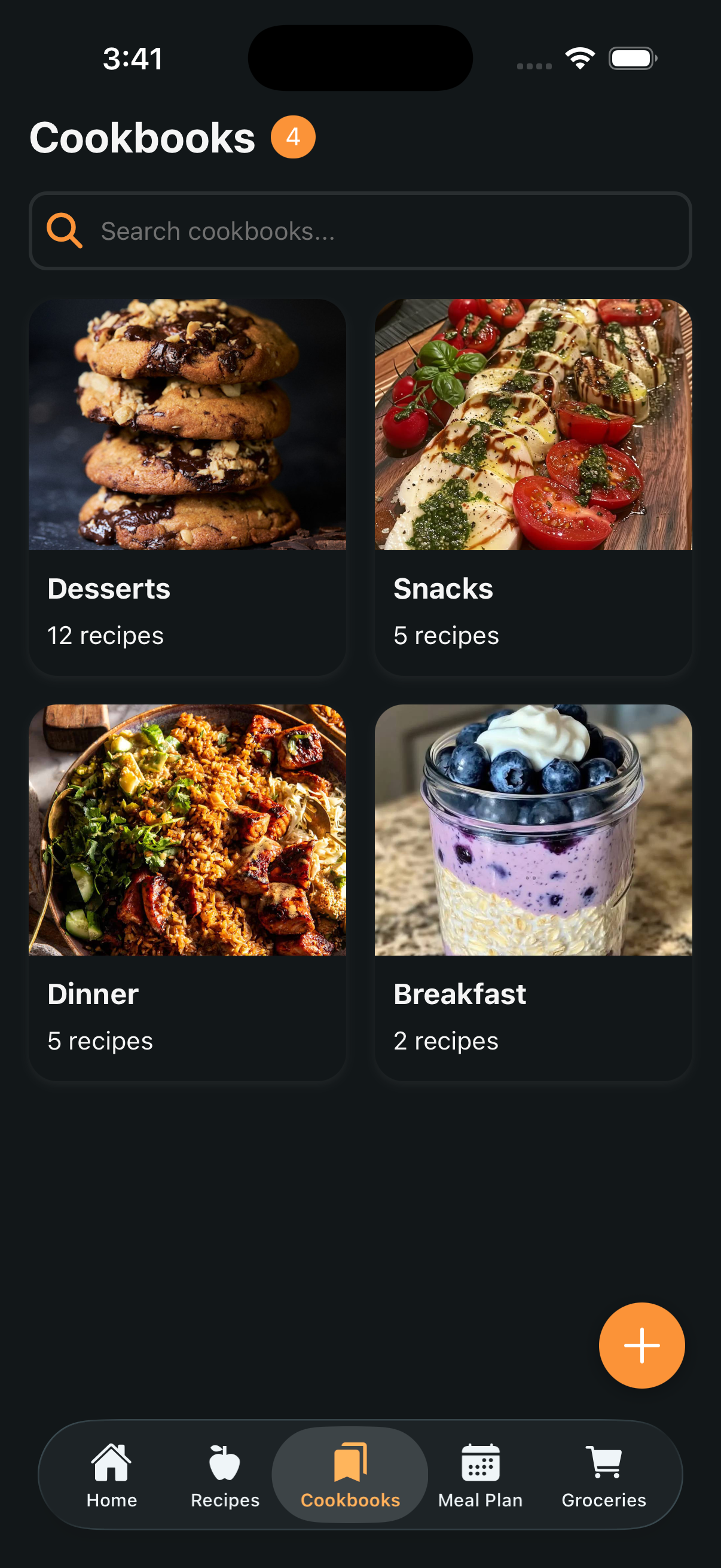
Cookbooks are Seasoned's top-level organizing unit, and you define them however makes sense for your life. Some people organize by meal type — Breakfasts, Weeknight Dinners, Weekend Projects. Others organize by who they're cooking for — Family Meals, Date Night, Meal Prep. Others organize by cuisine — Italian, Asian, Mexican. There's no right answer, and you can always reorganize as your collection grows.
Crucially, any recipe from any source — whether it came from a TikTok video or a French cooking blog — can live in any cookbook. Your Weeknight Dinners cookbook doesn't care where you found the recipe.
Tags for Cross-Cutting Categories
Tags add a second dimension to your organization. A recipe can be in the "Weeknight Dinners" cookbook and tagged "vegetarian" and "30 minutes." When you're looking for a quick meatless dinner, you can filter by both and get exactly what fits. Tags are especially useful for dietary needs, cooking time, season, or occasion.
Star Ratings and Private Notes
After you cook a recipe, spend ten seconds rating it (0–5 stars) and adding a private note — "doubled the garlic and it was perfect," or "needs more salt," or "great for a crowd, will make again." Over time these small annotations transform your collection from a list of intentions into a genuine personal cookbook — a record of what you've actually cooked and loved.
Full-Text Search Across Everything
Search in Seasoned spans your entire library: recipe names, ingredients, your personal notes, tags, and cookbook names. So when you're staring at a bunch of zucchini from your farm share and asking "what can I actually make with this?" — you get an answer from your collection, not a generic web search.

Custom Cookbooks
Create named collections organized any way that makes sense to you.
Tags
Apply multiple tags per recipe for flexible cross-category filtering.

Star Ratings
Rate recipes 0–5 stars after you cook them so the best ones rise to the top.

Full Search
Search by ingredient, recipe name, notes, or tags across your whole library.
Common Mistakes When Trying to Organize Recipes
A few pitfalls worth avoiding as you build your system:
Over-organizing from day one. It's tempting to spend a weekend creating the perfect folder hierarchy before you've even started importing. Resist. Start with a few broad cookbooks, import recipes for a few weeks, and let the organization evolve naturally from what you actually save.
Saving everything, cooking nothing. A collection only has value if you use it. Aim to actually cook from your collection at least once a week — this is what turns organizing into a habit rather than a project.
Relying on browser bookmarks as a backup system. Bookmarks don't extract recipes. If a site goes down or changes its URL structure, your bookmark leads to a 404. Import, don't bookmark.
⚠️ Worth Knowing
Social media videos can disappear without warning — creators delete posts, accounts get banned, or videos get taken down for music licensing. If you saved a TikTok recipe as a "like" and that video disappears, it's gone. Seasoned extracts and saves the actual recipe content at the time of import, so it stays in your collection regardless of what happens to the original.
The Payoff: From Organized Collection to Weekly Meal Plan
Once your recipes are organized in one place, the real reward kicks in. Instead of starting your weekly meal planning from scratch — scrolling TikTok looking for inspiration, Googling "easy weeknight dinners" — you can plan entirely from recipes you've already saved, vetted, and in many cases already cooked and loved.
In Seasoned, you pull up your collection, drag recipes into a weekly meal plan, and the app immediately generates a grocery list combining ingredients across all of your planned meals. What used to take 20 minutes of hunting and list-writing takes about two minutes.
That's the end state: less time managing food, more time actually cooking it.
Building Your Collection: Where to Start
The hardest part of any organizing project is starting. Here's a practical first week:
Download Seasoned and import 5–10 recipes you already love
Don't try to import everything at once. Start with recipes you cook regularly — the ones you'd be sad to lose. This immediately makes the app feel useful.
Create 2–3 cookbooks that reflect how you actually cook
Don't overthink this. "Weeknights," "Weekends," and "Want to Try" is a perfectly good starting structure.
Add Seasoned to your share sheet so saving becomes a reflex
The moment you share a recipe to Seasoned instead of liking a TikTok, you've broken the pattern. Do it once and it becomes automatic.
Plan one meal this week using only your Seasoned collection
This is the moment the whole system clicks. Planning dinner from your own curated collection feels completely different from starting at a blank search bar.
Seasoned is free to download with a 7-day trial that includes full access to all features. There's no better time to build the recipe system you've been meaning to build.
Start organizing your recipe collection today
Free download. Import from TikTok, Instagram, Pinterest, blogs, and any URL. Available for iPhone and iPad.